Product Description
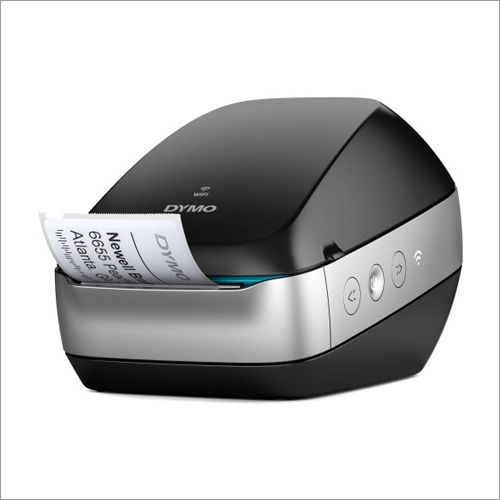
DYMO Label Printer is the printer which can be used for various labeling tasksfor printing address, return address and shipping labels, diskette labels, file folder, internet postage, bar codes, name badges, videotape labels, etc. DYMO Label Printer is known for its efficiency, effectiveness and quality, leading to high rising demands among our competitors.
| Brand | DYMO |
| CPU Type | 32-bit RISC CPU |
| Connectivity | USB 2.0 |
| Max. Print Width | 2 inches |
| Maximum Print Speed | 2 inch/Second |
| Max. Print Length | 100 inches |
| Resolution | 203 DPI (8 dots/mm) |
| Memory | STANDARD |
| Printing Method | Thermal Transfer |
| Model Name/Number | Standard |
Seamlessly Print Professional LabelsEnhance your organizational workflow with the DYMO Label Printer. Its direct thermal technology delivers clean, professional results without the hassle of replacing ink or toner. Compatible with both Windows and MacOS platforms and requiring only a USB connection, this printer makes label creation straightforward and efficient in multiple environments.
Designed for Versatility and DurabilityWith a wide supported label width (6mm to 62mm) and a maximum print length of up to 3 meters, this printer adapts to a variety of tasks including address labels, shipping tags, and inventory management. The ABS plastic body ensures longevity, while its compact footprint enables easy placement in any workspace.
FAQ's of DYMO Label Printer:
Q: How do I install the DYMO Label Printer on my computer?
A: To install the DYMO Label Printer, connect the printer to your computer using the provided USB 2.0 cable. Then, install the DYMO Label Software compatible with Windows or MacOS, following the on-screen instructions. No special drivers are required beyond the included software.
Q: What types and sizes of labels are compatible with this DYMO printer?
A: The DYMO Label Printer supports label rolls with widths from 6 mm to 62 mm and print lengths up to 3 meters, depending on the label roll. It is designed for use with DYMO-branded rolls for optimal performance.
Q: When should I select this label printer over other models?
A: Choose this printer when you require fast, monochrome label printing in environments such as offices, warehouses, or retail, where compatibility with both PC and Mac systems, direct thermal (no ink/toner), and a compact, durable design are priorities.
Q: Where can this DYMO Label Printer be used most effectively?
A: This printer is ideally suited for a wide range of applications-offices for organizing files, warehouses for inventory tagging, shipping departments for address labels, and retail for product labeling, thanks to its versatility and ease of use.
Q: What is the process for loading label rolls into the printer?
A: Open the printer's cover, place the appropriate DYMO label roll onto the roll holder, ensure the labels are fed correctly into the printer's mechanism, and then close the cover. The printer is then ready for use with the DYMO Label Software.
Q: How does direct thermal printing technology benefit users?
A: Direct thermal technology allows the printer to produce labels without any ink or toner, reducing running costs and maintenance. It ensures clean, precise prints, making it ideal for high-volume or continuous label printing tasks.









 Send Inquiry
 Send Inquiry
 Send SMS
 Call Me Free


 English
 Spanish
 French
 German
 Italian
 Chinese (Simplified)
 Japanese
 Korean
 Arabic
 Portuguese