


 Send Inquiry
Retail POS Printer
Price 8300 INR/ Piece
MOQ : 100 Pieces
Retail POS Printer Specification
- Interface
- USB 2.0
- Condition
- New
- Material
- Plastic
- Dimensions
- 20x18x12 Centimeter (cm)
- Automatic Grade
- Automatic
- Maximum Resolution
- 203dpi
- Use
- office
Retail POS Printer Trade Information
- Minimum Order Quantity
- 100 Pieces
- Payment Terms
- Cash on Delivery (COD), Cash Against Delivery (CAD), Cash Advance (CA), Cash in Advance (CID), Cheque
- Supply Ability
- 100 Pieces Per Day
- Delivery Time
- 10 Days
- Main Domestic Market
- All India
About Retail POS Printer
Retail POS Printer - We provide billing machine with printer for modern commercial sectors for ease and precision billing solution. It is precisely fabricated by our professionals following high definition engineering guidelines and implementing best quality raw materials. It is well-known in the market for its features like durability, high performance, longer functional life. Available in various specifications, this Retail POS Printer is offered in different specifications at very nominal price.
| Display | 3.0 in. color (TFT) (320 x 320) display |
| Brand | Epson |
| Resolution | 203 dpi (8 dots per mm) |
| Maximum Print Speed | 250mm/s (maximum) |
| Paper Size | 79mm |
| Condition | New |
Seamless Office Integration
The Retail POS Printer integrates effortlessly into office environments, ensuring fast and reliable point-of-sale transactions. Its compact design allows for flexible positioning on crowded counters or desks, while the automatic functionality reduces manual intervention, promoting workload efficiency and operational accuracy.
Robust Connectivity and Performance
Equipped with a USB 2.0 interface, this printer guarantees hassle-free connectivity with a range of POS terminals and computers. The maximum 203 dpi resolution delivers clear, professional receipts or labels, supporting quality documentation for both customers and staff.
FAQ's of Retail POS Printer:
Q: How do I connect the Retail POS Printer to my office system?
A: You can easily connect the Retail POS Printer to your office system using its USB 2.0 interface. Simply plug the printer into a compatible port, install any necessary drivers, and follow the setup instructions to begin printing.Q: What type of documents can this POS printer handle and what are its resolution capabilities?
A: The Retail POS Printer is designed for printing receipts, tickets, and labels, delivering crisp results with a maximum resolution of 203 dpi. This ensures your printouts are clear and professional for both business records and customer needs.Q: When is the best time to use this POS printer in an office setting?
A: This POS printer is ideal for use during high-volume transaction periods, such as at checkouts or reception desks, as its automatic features and fast operation streamline workflow and minimize wait times for customers.Q: Where can I source the Retail POS Printer in India?
A: You can obtain this product from a wide network of distributors, exporters, importers, manufacturers, retailers, service providers, suppliers, traders, and wholesalers across India.Q: What is the process for maintenance and cleaning of this printer?
A: Regularly clean the outer plastic casing with a soft, dry cloth, and periodically check the internal components for dust buildup. Refer to the user manual for specific maintenance guidelines to ensure optimal operation and longevity.Q: How is this printer beneficial compared to manual alternatives?
A: The automatic grade feature reduces manual effort, speeds up transaction times, and increases accuracy, making it superior to manual receipt writing or less-sophisticated office printers.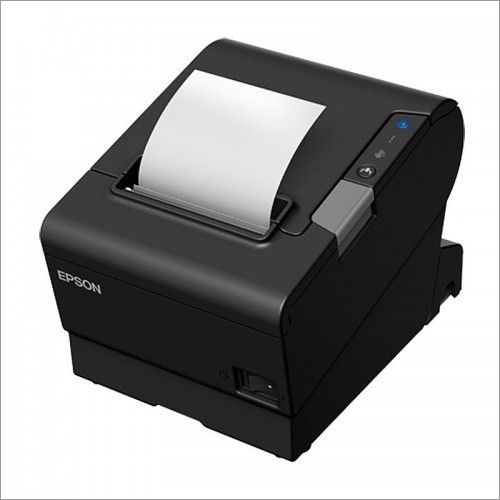
Tell us about your requirement

Price:
Quantity
Select Unit
- 50
- 100
- 200
- 250
- 500
- 1000+
Additional detail
Mobile number
Email


HONESTATTVA IT SOLUTIONS PRIVATE LIMITED
GST : 24AAECH4103Q1ZK
Contact Details

- B No 02, Ground Floor, Near New RBI Lane, Ashram Road,Ahmedabad - 380014, Gujarat, India

- Mr. Hardik (Director)
- Mobile :08045816199


HONESTATTVA IT SOLUTIONS PVT. LTD.
All Rights Reserved.(Terms of Use)
Developed and Managed by Infocom Network Private Limited.
Developed and Managed by Infocom Network Private Limited.


 English
 Spanish
 French
 German
 Italian
 Chinese (Simplified)
 Japanese
 Korean
 Arabic
 Portuguese